Google Sheets as a CRM: How Far It Honestly Goes
How to use Google Sheets as a CRM, with a sample sheet layout, where it breaks on follow-ups and sharing, and when a small team should move to a real CRM.
Table of Contents
- Can you use Google Sheets as a CRM?
- How to set up Google Sheets as a CRM
- Where Google Sheets is still the right answer
- Where the sheet starts to crack
- The follow-up problem
- Shared sheets: who can see and change what
- One sheet, one shape: the custom field problem
- Leads that type themselves in
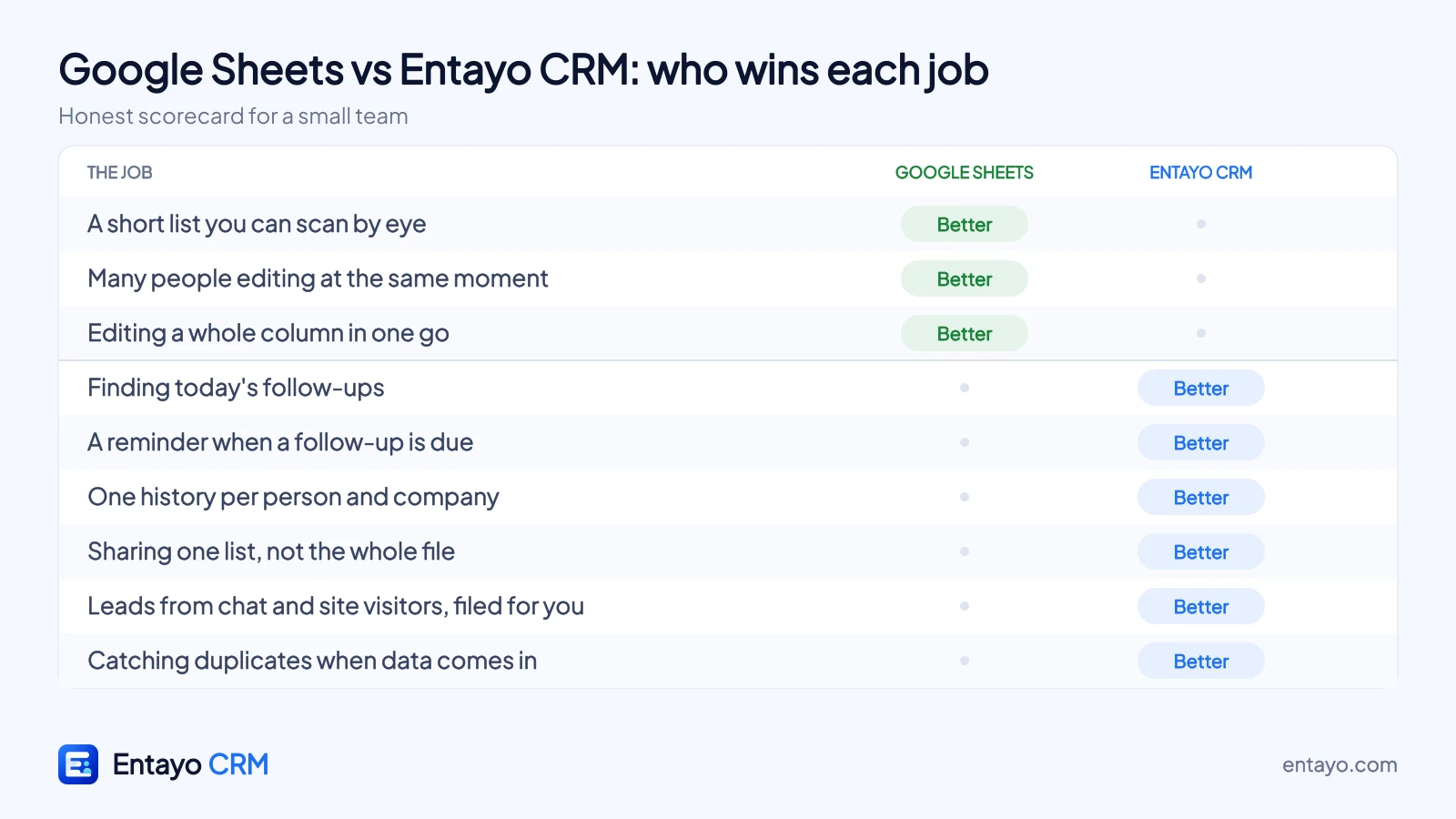
- Google Sheets vs a CRM: side by side
- Seven signs you have outgrown your spreadsheet CRM
- What Entayo CRM adds beyond the sheet
- Where Entayo CRM is honestly behind a sheet
- Why switch when Google Sheets costs nothing?
- How to move from Google Sheets to a CRM without losing data
- Should you run both?
- The bottom line
- Resources
TL;DR
- Google Sheets is a fine CRM for a short list, a one-off project, or a team that mostly bulk-edits columns.
- Set it up properly: one row per person, separate tabs for companies and activity, dropdowns for status, and a next-follow-up date column.
- It breaks on the daily question: who do I follow up with today, and what do I already know about them?
- Sheets can protect ranges and show cell edit history, but everyone with access still sees every row, and nothing reminds you when a date arrives unless you write a script.
- Move when follow-ups slip, history lives in cell comments, or nobody trusts the sheet. Copy it, paste it into the CRM, check every row, then stop editing the sheet.
Picture a three-person team running sales from one Google Sheet. It works. Everyone can open it, add a row, and type a date in the follow-up column. Then the list grows. One morning someone asks, “Who are we supposed to call today?”, and nobody can answer without scrolling. (If that already sounds familiar, you can paste your sheet into Entayo CRM and get follow-up reminders from the same day.)
Using Google Sheets as a CRM is how most small teams start, and for a while it is the right call. This guide is for small teams still running their contacts in a spreadsheet. It shows how to set one up properly, where it breaks, the signs that you have outgrown it, and where our own product, Entayo CRM, is still behind a sheet.
Can you use Google Sheets as a CRM?
Yes. A CRM (customer relationship management system) is, at its simplest, a list of the people you sell to, what you last said to them, and what happens next. A spreadsheet can hold all three. What it cannot do is remember for you: it will not remind you when a follow-up date arrives, keep one history per person, or show each teammate only their part of the list.
So the honest answer is: Google Sheets works as a CRM while the list is short and the follow-ups fit in your head. The rest of this article is about where that line sits.
How to set up Google Sheets as a CRM
If you are going to run contacts in a sheet, set it up like a CRM from day one. It makes the sheet last longer, and it makes the move to a real CRM painless later.
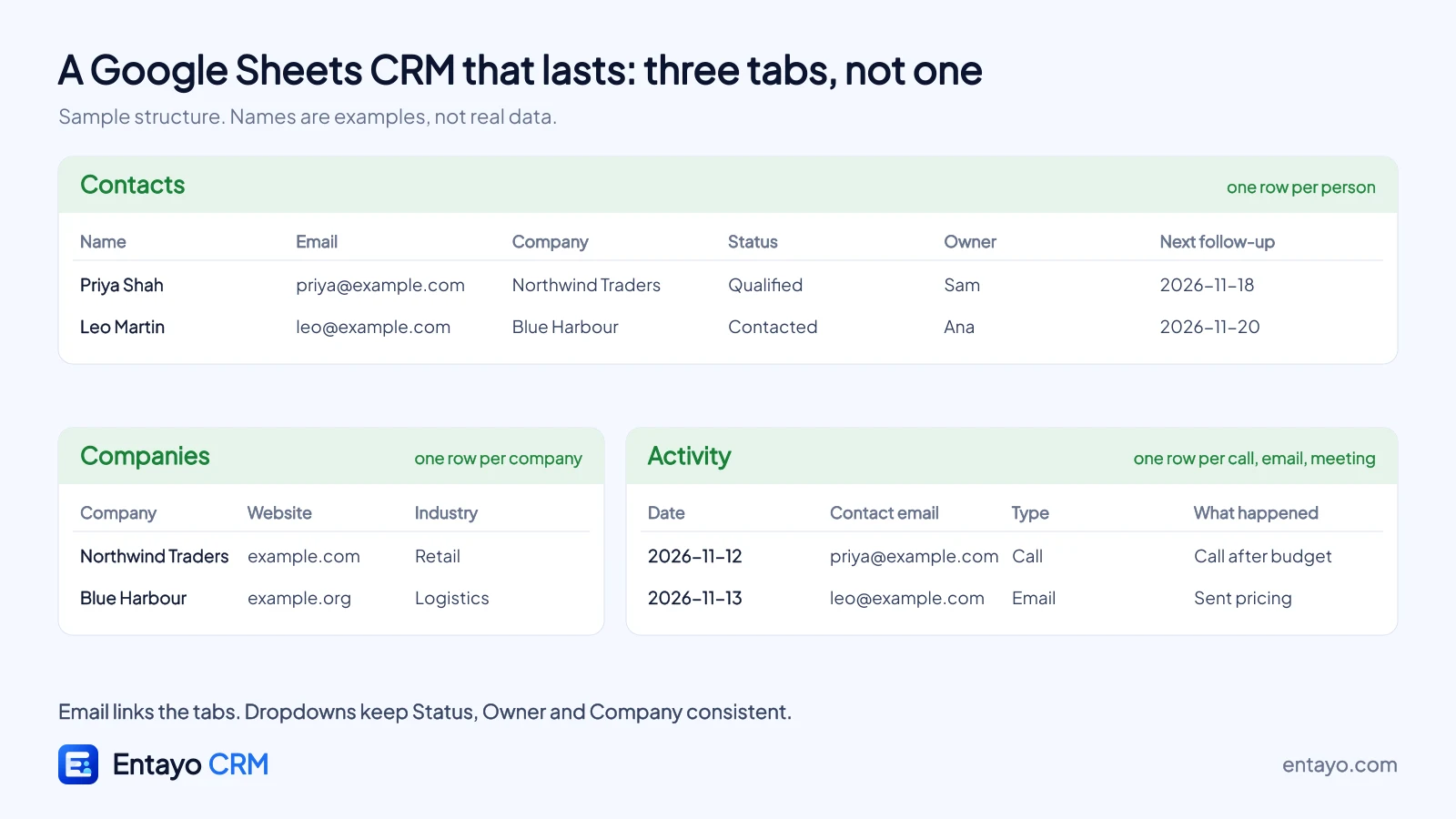
Use three tabs, not one:
- Contacts: one row per person. Never two rows for the same person.
- Companies: one row per company, so the company name is spelled the same way every time.
- Activity: one row per call, email or meeting, with the contact’s email to link it back.
Here is a sample layout for the Contacts tab:
| Column | Type | Example | Why it matters |
|---|---|---|---|
| Name | Text | Priya Shah | Who the row is |
| Text | [email protected] | The key that links tabs and catches duplicates | |
| Phone | Text | +44 20 7946 0000 | Store as text so the leading + survives |
| Company | Dropdown from the Companies tab | Northwind Traders | Same spelling every time |
| Job title | Text | Head of Operations | Tells you who you are talking to |
| Status | Dropdown | New, Contacted, Qualified, Won, Lost | Your pipeline in one column |
| Owner | Dropdown or person chip | Sam | Who is responsible for the next step |
| Source | Dropdown | Website, Referral, Event | Where good leads come from |
| Last contact | Date | 2026-11-12 | Spots contacts going cold |
| Next follow-up | Date | 2026-11-18 | The column you check every morning |
| Notes | Text | Wants a call after budget review | Short context only, history goes on the Activity tab |
(The names and numbers above are examples, not real data.)
A few habits make the sheet much easier to live with:
- Convert the range to a table. In Google Sheets, Format → Convert to table lets you give each column a type, including dropdown, date and people chips, so bad values get flagged.
- Freeze the header row and use filter views, so one person filtering does not change what everyone sees.
- Highlight overdue follow-ups with a conditional formatting custom formula such as
=AND($J2<>"", $J2<TODAY()). - Build a “today” view on its own tab with
=FILTER(Contacts!A2:K, Contacts!J2:J=TODAY()).
Set up like this, a sheet will carry a small team further than most people expect.
Where Google Sheets is still the right answer
A spreadsheet is a fine CRM in a few situations. If yours looks like this, you do not need to move yet.
- The list is short. A few dozen records with a handful of columns each are easy to scan by eye.
- Several people edit the same data at once. Sheets handles live, side-by-side editing very well.
- You bulk-edit whole columns. Select a column, type a value, fill it down. Few tools beat a sheet at that.
- You copy rows around. Select any set of rows, copy them, paste them into another sheet. Done.
- It is a one-off. An event guest list or a short campaign does not need a CRM.
With ten or twenty records you can check every follow-up date by hand each morning. That is not a problem worth solving with software.
Where the sheet starts to crack
The trouble starts as the list grows. In our own experience, a busy contact sheet starts to feel slow somewhere in the hundreds to low thousands of rows, once filters, formulas and several editors pile up. Google’s hard limit is much higher, up to 20 million cells per spreadsheet (see Resources below), but slowness and clutter arrive long before the cap.
The real cost is the daily question: who do I contact today, and what do I already know about them? In a sheet, answering it means searching the file for the row, reading across it to find the follow-up date, then going to another tab, or into cell comments, to find what was said last time. Do that for every contact, every day.
In a CRM, the record is the unit, not the row. You find a person with the search bar or a filter, click once, and see their details, their company and every activity logged against them. In Entayo CRM, filters work on any column, combine with AND and OR, and the filtered view can be shared as a link.
The follow-up problem
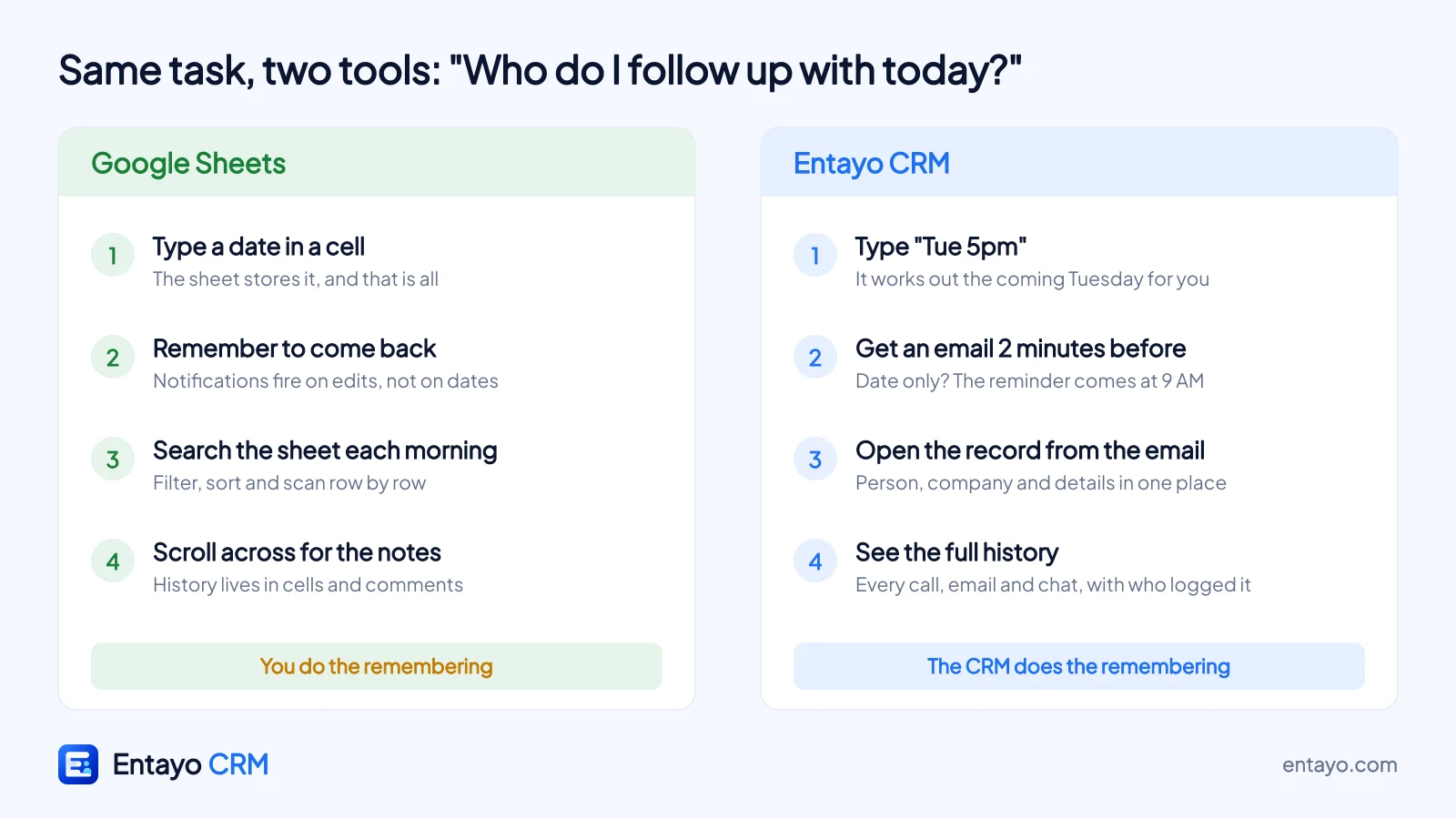
Follow-ups are where spreadsheets quietly lose deals. You type “Tuesday” into a cell, then you have to remember to come back on Tuesday and look. Google Sheets has conditional notifications, but they fire when a cell changes, not when a date arrives.
You can close that gap yourself with Google Apps Script: a time-driven trigger can run a script every morning that emails anyone whose follow-up is today. It works, but now you own a small piece of software. Someone has to write it, fix it when a column moves, and notice when it silently stops.
In Entayo CRM you type the follow-up the way you would say it: “Tue 5pm”, “tomorrow 10:30am” or “5 days”. It works out the date itself (the coming Tuesday, in this case) and shows what it understood before you save. Then it emails you two minutes before the follow-up, with the contact’s details. A follow-up with no time gets its reminder at 9 AM that day.
For bigger pieces of work there are tasks, with a type, a priority and a due date, linked to the record.
Shared sheets: who can see and change what
Sharing is the second crack. You create a record, fill in the details, and a week later the values are different. A teammate changed them, by mistake or on purpose, and you do not know why.
To be fair to Sheets, it has real tools here. You can protect a range or a tab so only chosen people can edit it, and you can see the edit history of a single cell.
But protection controls who can edit, not who can see: everyone with access to the file still sees every row. And edit history has to be checked cell by cell, some changes never show there, and restoring an old version clears the cell-by-cell history from before it.
In Entayo CRM you share a list, or a segment of it, with a teammate and choose their access to that one list: no access, view, edit, or edit and delete. Everything else stays out of their sight. You can also assign a contact to one or more teammates, and they can follow that person from anywhere in the CRM.
Every activity on a record also shows who logged it, so the history of a contact is never anonymous.
One sheet, one shape: the custom field problem
A sheet has one set of columns for every row. Add a “Budget” column for one prospect and it appears for everyone, mostly empty. Hide it and someone else wonders where it went.
A CRM separates people from companies, and gives each its own fields. In Entayo CRM you can add a field any time, and hide columns in a list where they do not belong, without breaking anybody else’s view. When you import a file with extra columns, you choose for each one: make it a real field you can sort and filter, or keep it as extra data on the records that carry it.
Leads that type themselves in
In a sheet, every lead is typed in by hand. Someone fills in a form or starts a chat on your website, and you copy their details across later, if you remember.
Entayo CRM fills itself from the other apps in your Zocton workspace:
- TraceFlow (website visitor tracking): as soon as a visitor gives an email address, they become a person in the CRM, in a list called “TraceFlow Visitors”.
- ZuvoChat (website chat): a visitor who gives an email becomes a person, and their chats and summaries are filed as activity against them.
A returning visitor is matched to the person who already exists, so you get one history, not two rows. See how the integrations work.
Google Sheets vs a CRM: side by side
| Job | Google Sheets | Entayo CRM |
|---|---|---|
| Cost to start | Free | Sign up with a Zocton account |
| Short list, scanned by eye | Excellent | Fine, but more than you need |
| Editing a whole column at once | Excellent: type, fill down, formulas | Update Field on selected records; no formulas |
| Finding today’s follow-ups | A filter or a formula you build | Follow-up field with reminder emails |
| Reminder when a follow-up is due | Only with an Apps Script you maintain | Built in: 2 minutes before, or 9 AM |
| History of every conversation | Another tab, or cell comments | Activity timeline on the record |
| People and companies | Two tabs you keep in step | Two linked record types |
| Pipeline stages | A status dropdown | Stages per record type, with a kanban board |
| Who can see what | Everyone with access sees every row | Share one list: no access, view, edit, edit and delete |
| Duplicates | Found by hand or by formula | Checked on import by email, name and company, or your field |
| Leads from website chat and visitors | Typed in by hand | Filed automatically from ZuvoChat and TraceFlow |
Seven signs you have outgrown your spreadsheet CRM
No row count tells you it is time to move. These do:
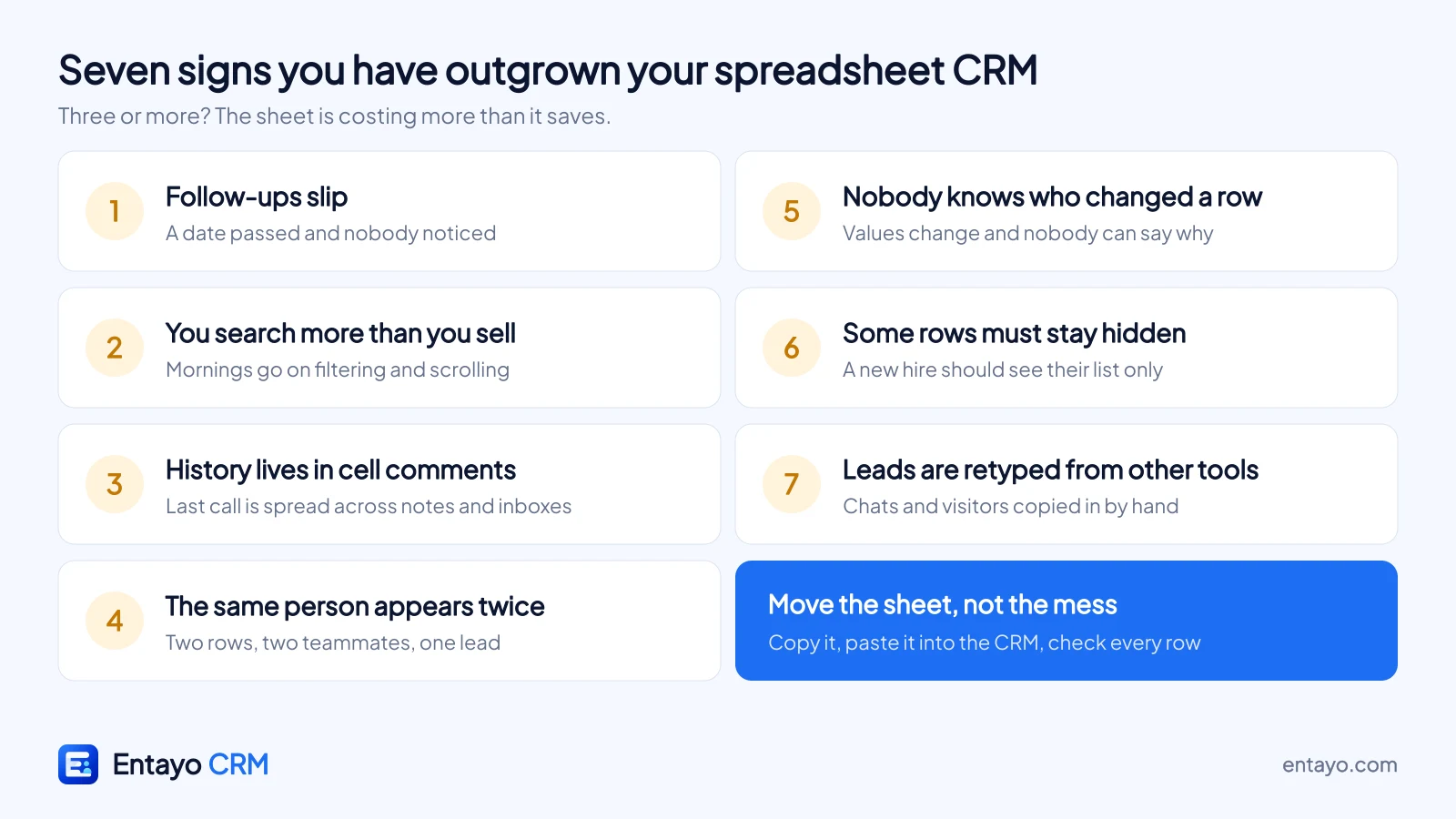
- Follow-ups slip. A date passed and nobody noticed until the prospect went quiet.
- You search more than you sell. The first part of every morning is filtering and scrolling.
- History lives in cell comments. What was said last time is spread across notes, comments and inboxes.
- The same person appears twice. Two rows, two spellings, two teammates chasing one lead.
- Nobody knows who changed a row. Values change and nobody can say why.
- You need to hide rows from some teammates. A new hire should see their list, not the whole file.
- Leads are retyped from other tools. Every chat, form and visitor is copied in by hand, or not at all.
If three or more of these are true, the sheet is costing you more than it saves.
What Entayo CRM adds beyond the sheet
Entayo CRM is built for the work a sheet makes hard: keeping track of people, companies and what happens next. Every claim below is a feature you can use today.
- One record per person and per company. Lists and segments point at those records instead of copying them, so an edit made anywhere is true everywhere.
- A pipeline you can see. Each record type has its own stages; drag a card on the kanban board from Contacted to Won and the record moves with it.
- Follow-ups that remind you, plus tasks with a type, priority and due date.
- A history per contact: emails, calls, meetings, WhatsApp and LinkedIn messages logged on the record.
- Recent conversations, which calls out the people you have not spoken to in a while, so nobody goes cold.
- Merge contacts when the same person shows up twice: tick them and merge.
- Table, kanban and map views of the same records, and files attached to the person they belong to.
- Email campaigns sent to a list through your own sending server.
- A REST API with your own key, so your own systems and AI assistants can look up records, log activities and create follow-up tasks.
It runs in the browser and can be installed on a phone. See every feature or email campaigns for the detail.
Where Entayo CRM is honestly behind a sheet
The title promises honesty, so here are the gaps.
- No spreadsheet-style column editing. You can select records in a list and set one field on all of them with Update Field, but you cannot click a column header and edit every value in place, drag a value down, or write a formula. Editing from the column header is planned.
- Copying records is not copy and paste. You can select many records and act on them (assign, set a stage, update a field), but you cannot copy a block of rows and paste it somewhere else the way a sheet lets you.
- Day-to-day edits are per record. Changing one value usually means finding that record and opening it.
- No one-click CSV export yet. Your data is not trapped (see below), but you cannot yet press a button and get a spreadsheet back.
If your work is mostly reshaping columns of data, a spreadsheet will feel faster. If your work is people, companies and follow-ups, the CRM will.
Why switch when Google Sheets costs nothing?
Sheets is free, and that is a real advantage. The cost of a sheet is not on an invoice. It is the time spent searching, the follow-up nobody saw, and the change nobody can explain.
What a CRM gives you is convenience: people data, company data and the relationship with each managed in one app. When everything about a contact sits on one record, anyone on the team can find it and use it.
You are not locked in, either. Every record is reachable through the REST API with your own API key, and your Zocton workspace keeps a daily backup of your CRM that you can download, any day of the last thirty.
How to move from Google Sheets to a CRM without losing data
Rushing the move is the one way to lose data. Do it in this order.
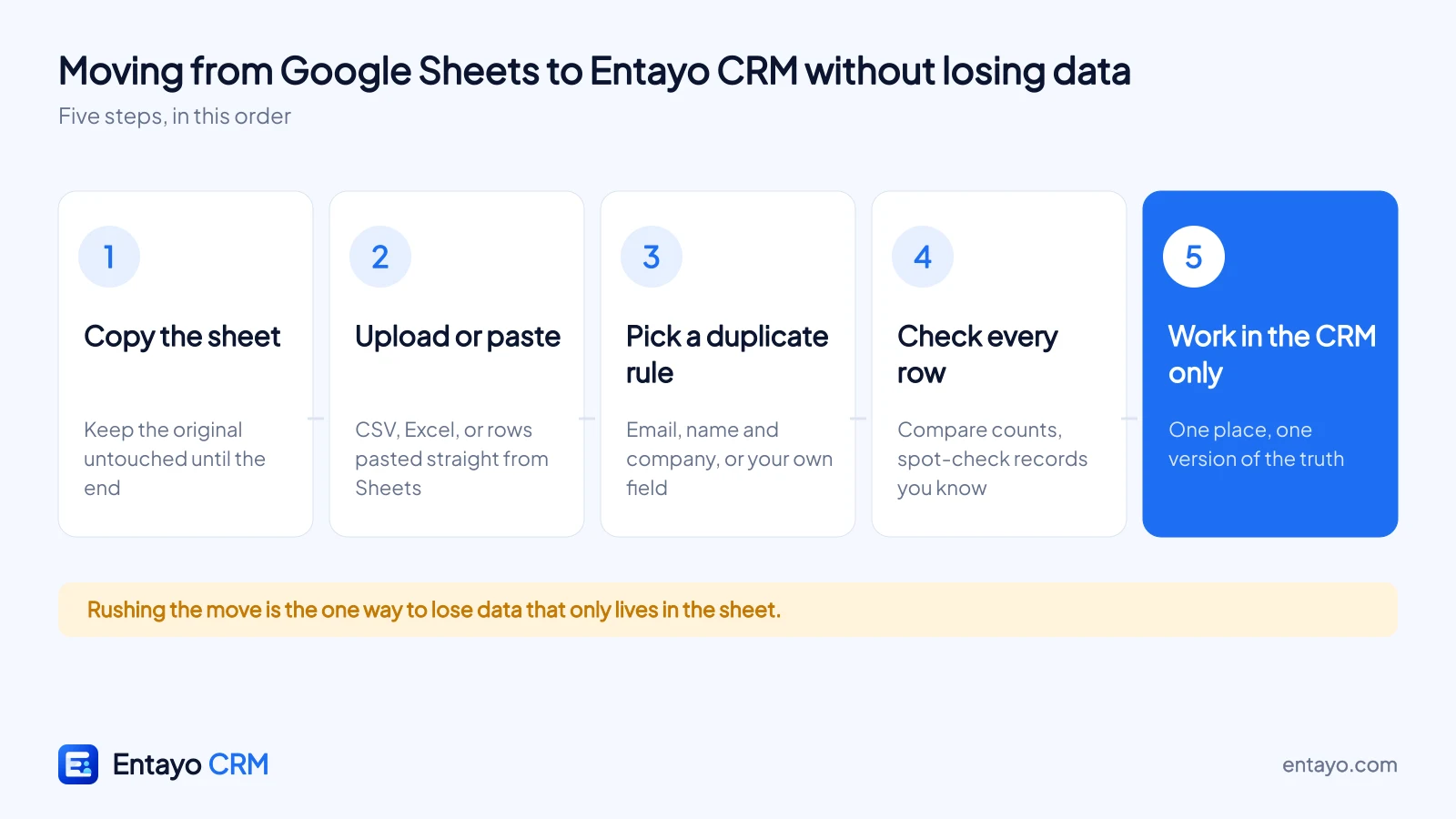
- Make a copy of the sheet. Keep the original untouched until you are done. Tidy the copy: one header row, one row per person, no merged cells.
- Bring the rows in. Upload a CSV or Excel file, or select the rows in Google Sheets, copy them, and paste them into the importer. It detects the separator and whether the first row holds column names. Tick Also import companies from this file to build your company records at the same time.
- Map the columns and pick a duplicate rule. Match duplicates by email, by name and company, or by a field you choose. Companies that already exist are shown side by side so you decide what to keep.
- Check that every row arrived. Compare the counts and spot-check a few records you know well.
- Switch over. From here on, work in the CRM. The import guide covers each step.
Should you run both?
You can run Google Sheets and a CRM side by side, but keeping the same record in two places is hard. One gets updated, the other does not, and soon nobody trusts either. Once your data is in Entayo CRM and checked, use the CRM only.
The bottom line
Google Sheets is a good first CRM and a poor permanent one. Set it up properly and it will carry a small team through its first contacts. When follow-ups start slipping, history lives in comments, and you cannot give a teammate their own list, the sheet has done its job. Move to a CRM, move carefully, and keep the sheet only as the copy you made before the import.
Browse every Entayo CRM feature, see how the integrations work, or read the import guide before you move.
Resources
- Google Drive Help: files you can store in Google Drive (Sheets cell limit)
- Google Docs Editors Help: use tables in Google Sheets
- Google Docs Editors Help: protect, hide and edit sheets
- Google Docs Editors Help: find what’s changed in a file (cell edit history)
- Google Docs Editors Help: use conditional notifications in Google Sheets
- Google Apps Script: installable triggers (time-driven triggers)
Frequently asked questions
Can Google Sheets be used as a CRM?
Yes, for a small list. One row per person, a status dropdown, an owner column and a next-follow-up date will carry a small team for a while. It gets hard once you search the sheet every day for today's follow-ups, keep a history per contact, or need to control who sees which rows.
Is Google Sheets a good CRM for a small business?
It is a good first CRM: free, familiar and easy to share. It is a weak long-term CRM, because it has no record of each conversation, no reminders when a follow-up date arrives, and no way to give one teammate one list while hiding the rest.
What columns should a Google Sheets CRM have?
Start with name, email, phone, company, job title, status, owner, source, last contact date, next follow-up date and notes. Keep companies on their own tab and log each call or email as a row on an activity tab, so the contacts tab stays one row per person.
How many contacts can Google Sheets handle?
Google's limit is up to 20 million cells per spreadsheet, so the cap is rarely the problem. A shared contact sheet usually gets slow and hard to work long before that, once formulas, filters and several editors pile up.
Does Google Sheets send follow-up reminders?
Not on its own. Its notifications fire when cells change, not when a date arrives. You can build date reminders with a Google Apps Script time-driven trigger, but you write and maintain the script yourself. Entayo CRM emails you two minutes before a follow-up with a time, and at 9 AM when it has no time.
When should a small team move from a spreadsheet to a CRM?
There is no magic row count. Move when follow-ups start slipping, when you search the sheet more than you work it, when the history of a contact lives in cell comments, or when shared editing causes changes nobody can explain.
How do I move my Google Sheet into Entayo CRM?
Make a copy of the sheet, then upload it as CSV or Excel, or copy the rows and paste them into the importer. Map the columns, choose how duplicates are matched (email, name and company, or a field you pick), import, and check that every row arrived before you stop using the sheet.
Can I get my data back out of Entayo CRM?
Yes. Every record is reachable through the Entayo CRM REST API with your own API key, and your Zocton workspace keeps a daily backup you can download, any day of the last thirty. A one-click CSV export to open in Google Sheets is not there yet.
Should I keep using Google Sheets alongside the CRM?
It is possible, but keeping the same record in two places means two versions of the truth. Once your data is in the CRM and checked, work in the CRM only.